A ComfyUI workflow as a public service, without exposing ComfyUI
By Anastasiia Butova, ComfyUI and diffusion-model engineer, Belgrade · published 23 September 2026
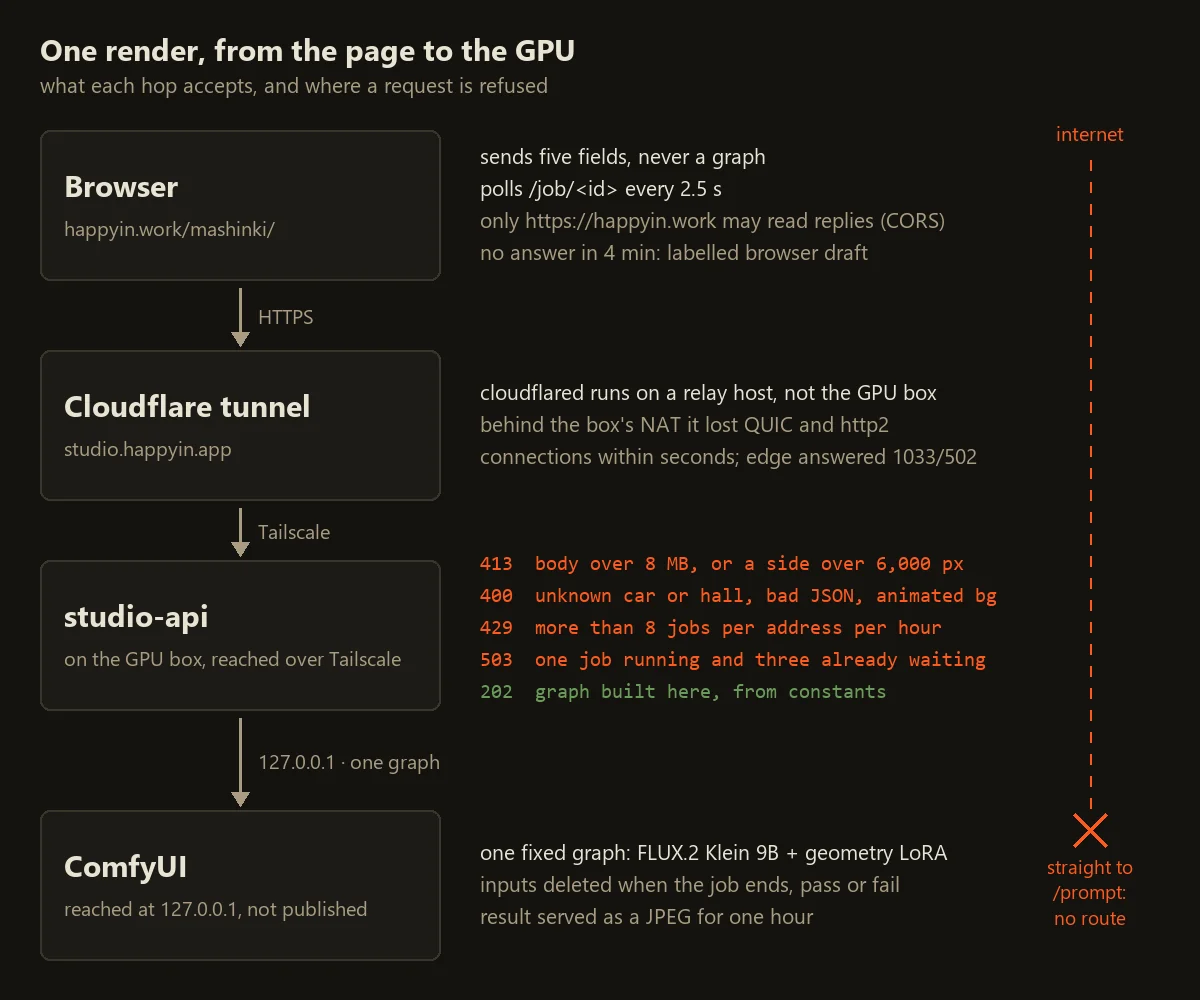
The car studio on /mashinki/ lets anyone put a car into a showroom, press render and get back a frame from the real pipeline: FLUX.2 Klein 9B with our geometry-restore LoRA, on the mashinki GPU box, in 30 to 60 seconds. The ComfyUI that renders it is not published to the internet at all. Between the two sits a small Python service, and this post is about what it accepts, what it refuses, and the tunnel that did not work where I first put it.
Every production ComfyUI pipeline I have built runs this way: the graph is submitted by code, not clicked in the editor (more on that kind of work on /comfyui/). Usually the caller is a backend. Here the caller is anyone with a browser, which makes every design question sharper.
Why /prompt never faces the internet
ComfyUI's HTTP API is built for the person who owns the machine. POST /prompt takes a whole graph in API format and runs it. A graph is a program: a loader node takes a file name, a save node writes a file, and every custom node installed on the server is one more function the caller can invoke with arguments of their choosing. So anyone who can reach /prompt can load any model on the box, read whatever the ComfyUI process can read and write wherever it can write. There is no field in that request you could validate, because the request is the code.
For me this is not theoretical. In February 2026 a ComfyUI container on a GPU server I worked on was mining Monero. Its API port was open to the internet without authentication, someone sent it a workflow with an eval node from a third-party pack, and their Python rewrote ComfyUI's own execution.py. I wrote the cleanup runbook, and the full story is in the post about custom nodes in production. In April, Censys described a campaign against internet-exposed ComfyUI, of which it still finds more than a thousand instances, and the same node is on its list.
So the ComfyUI on the mashinki box is not published anywhere. The service reaches it on the box itself, at 127.0.0.1, and the public talks only to the service, which has no way to express a graph.
Six values, and the graph is built on our side
The render button sends POST /compose with five fields. The service knows six, because a hall and your own background are alternatives. Each is bounded before it touches anything:
| field | accepted |
|---|---|
car |
one of four ids, used as a dictionary key |
scene |
one of seven hall ids, used as a dictionary key; required unless bg is sent |
x |
number, clamped to 12–88 (per cent of the frame width) |
y |
number, clamped to 40–96 (the ground line, per cent of the height) |
scale |
number, clamped to 34–94 (car width, per cent of the frame) |
bg |
optional base64 still image, see below |
An unknown car or hall, JSON that does not parse, or a coordinate that is not a number gets a 400. Fields the service does not know are never read. The check is as plain as it looks; this is the production code:
car = str(spec.get("car", ""))
scene = str(spec.get("scene", ""))
bg = spec.get("bg")
if bg is not None and not isinstance(bg, str):
    return self._json(400, {"error": "bg must be a base64 string"})
if car not in CARS:
    return self._json(400, {"error": "unknown car"})
# A hall is required only when the caller did not bring their own plate.
if not bg and scene not in SCENES:
    return self._json(400, {"error": "unknown scene"})
try:
    x = float(spec.get("x", 50)); y = float(spec.get("y", 82)); sc = float(spec.get("scale", 62))
except (TypeError, ValueError):
    return self._json(400, {"error": "x, y and scale must be numbers"})
x = max(12.0, min(88.0, x)); y = max(40.0, min(96.0, y)); sc = max(34.0, min(94.0, sc))
The graph is a Python dict inside the service, and all its values but one come from production rather than from me. The model files, the LoRA at step 2,000, 6 steps, the euler sampler with the beta scheduler and the production prompt word for word were copied on 28 August out of the live dispatcher container, and the code names the file each one came from. The caller's influence on that graph is small and indirect: the composite it loads is a file the service wrote under a name it generated, and the body type and dimensions in the prompt come from a table of four entries, the values our car identity service returned for those four frames. The seed is ours too.
One difference from production is deliberate. Production runs the adapter at 0.7. On the site I run it at 1.0, because a demo frame is allowed to lean harder than a dealer's batch, and the page prints that number while the job is rendering.
Refuse early, decode late
Most of the thinking went into the order of the checks. They run from cheapest to most expensive:
Content-Lengthover 8 MB: 413, without parsing the body.- An address that has already spent its hour and sends more than 2 KB: 429, also without parsing the body. This check consumes nothing.
- Parse the JSON and validate the fields.
- The budget: eight jobs per address per hour, or 429. The address is the one Cloudflare passes in
CF-Connecting-IP. A job is counted here, so a 503 at the next step still uses one of the eight. - The queue: one job runs and at most three wait, or 503.
- Only now, if a background was sent, decode it.
An image is the most expensive thing the service does for a stranger, and we do not owe it to somebody we were going to turn away anyway.
The 413 taught me something I did not expect. If the service answers before the caller has finished uploading, the upload is reset and the tunnel in front reports its own 502. Measured: a 20 MB body got a Cloudflare 502, not our 413, so the caller saw a broken gateway instead of the reason. Now the service reads the body and throws it away in 64 KB chunks, up to 64 MB, then answers with its own 413; for anything declared larger it stops at 64 MB, answers and closes the connection. A 20-second socket timeout drops a caller who goes quiet mid-upload.
The one thing a caller may send
A viewer can bring a photo of their own hall. It arrives as base64 in the same JSON and is never passed on as it arrived. Trimmed from save_plate, with three short comments of mine added:
im = Image.open(io.BytesIO(raw))              # reads the header, not the pixels
if im.format not in PLATE_FORMATS:            # JPEG, PNG, WEBP
    raise PlateRefused(400, "background must be a jpeg, png or webp still")
if getattr(im, "n_frames", 1) > 1:
    raise PlateRefused(400, "background must be a still image, not an animation")
w, h = im.size
if w < 64 or h < 64:
    raise PlateRefused(400, "background is too small to place a car in")
if w > MAX_SIDE or h > MAX_SIDE:              # 6,000 px
    raise PlateRefused(413, "background is larger than %d px on a side" % MAX_SIDE)
im = im.convert("RGB")                        # decodes here, inside the bound checked above
im.save(path, "JPEG", quality=92)             # our encoder, our bytes, from this point on
The size is read from the header before a single pixel is decompressed, so a 79 KB file that declares 8000×8000 is refused without ever being inflated. Only three formats are accepted, because those are what a browser file picker realistically gives you for a photograph, and every other decoder PIL carries is surface we would open for nobody's benefit. An animation is refused, so frame two of anything is never decoded. Then the picture is re-encoded as our own JPEG. Whatever was hidden in the container, a payload after the image data or a hostile metadata block, does not survive, because none of it is pixels.
The plate is written under the job id and deleted when the job ends, pass or fail. A job still queued when the process restarts never reaches its cleanup, so a sweep removes any plate older than an hour.
One more detail changed the prompt. For our seven halls the prompt carries a background hint where we measured one: the two dark halls get "preserve the dark drapes and dark ceiling exposure". For a stranger's photo the hint is empty rather than guessed. We have measured nothing about that room, and a wrong hint would push the exposure of a room the model can already see.
What is kept, and for how long
A job id is 16 hex characters cut from a random UUID. /job/<id> and /img/<id>.jpg match a strict pattern, and /img/ serves nothing that is not a finished job of this process. The JPEG it serves is kept for an hour; a sweep every five minutes deletes it and forgets the job. The 2048-pixel composite that went into ComfyUI's input folder is deleted in a finally block. Before that fix, a failed render left its composite there for good.
Access-Control-Allow-Origin is fixed to https://happyin.work. It is worth being exact about what that buys. CORS only stops a script on another website from reading our responses in a browser; it does not stop curl. What actually limits abuse is the narrow input, the hourly budget and the queue. CORS just keeps someone else's page from driving the studio as its own backend.
States the page can show
POST /compose answers at once with 202 and a job id; the GPU work happens later. The page polls GET /job/<id> every 2.5 seconds, and the label under the frame is the box's own state: waiting, compositing, queued-on-gpu, rendering, then done or error. I wanted the words to come from the box, because a timer and the GPU disagree the moment the GPU is busy. The progress bar only follows elapsed time, on a curve that never reaches 100%: a returned frame is the only thing that may end it.
Inside, the service polls ComfyUI's /history every half second. It used to be every four seconds. The production dispatcher polls at 0.2 s, and at four the viewer waited up to four extra seconds after the GPU had already finished, which on a pass of about 45 seconds was most of the overhead they could see. Two passes measured on 28 August took 29.5 s and 57.2 s.
If the box refuses or goes silent, the page composites the car in the browser instead and says so on the frame. A returned render is labelled rendered on the gpu, a local one browser composite · draft, and the caption gives the reason from the status code: this hour's eight frames are spent, the GPU queue is full, the file is too big, the box refused this frame, or the GPU did not answer. After four minutes of polling the page stops waiting. A viewer should never mistake a browser paste for model output.
The tunnel, and where it could not run
The public name is studio.happyin.app, served through a Cloudflare tunnel. The obvious place for cloudflared was the GPU box itself: a tunnel dials out, so NAT should not matter. It did. Behind the mashinki host's NAT, cloudflared registered connections and lost them within seconds, over QUIC (failed to dial to edge with quic: timeout: no recent network activity) and over http2 alike, and the edge answered 1033 and 502 the whole time.
I did not fight that NAT. The tunnel now runs on another machine of ours with a stable connection, as a systemd unit around the official cloudflared image with host networking, and it reaches the box over Tailscale. The service does not know or care where the tunnel runs.
The NAT was not the most expensive mistake, though. Before any of this worked, I had written down that the blocker was a missing Cloudflare token scope for the happyin.work zone. It was not. A token I already had could create tunnels and DNS records on another account, and the endpoint never needed to live under happyin.work: a hostname on happyin.app does the job. The blocker was an assumption about my own access, and I should have checked what my credentials could do before writing "blocked".
Limits
- The budget and the job table live in memory. A restart forgets who spent what and drops queued jobs; the sweep only guarantees that their uploaded plates do not outlive the hour.
- Rereading the code for this post, I found one file nothing removed: the PNG that ComfyUI's save node writes into its output folder, renders over a viewer's own photo included. The service now deletes it right after copying the frame out. The first attempt failed without a sound, because ComfyUI runs as root and creates that folder root-owned; the delete raised a permission error and the code swallowed it. Counting the folder before and after one render is what caught it (7 files, then 8). The folder now belongs to the service's user, and a failed delete is printed instead of ignored.
- Car renders run one at a time. With one job running and three waiting, a fifth job gets a 503 and the viewer gets a draft.
- The socket timeout catches silence, not a slow trickle, so a thread could be held open that way. The body now has a deadline of its own, 90 seconds for the whole request rather than 20 for each read.
- There are no accounts. Anyone can spend eight frames an hour from one address, which for a demo is the right price.
What I would do again
Build the graph from constants copied out of the live pipeline, with a comment naming the file each value came from; when production changes, the diff shows it. Check in order of cost and decode last. Re-encode whatever a stranger uploads: it is a few lines, and it removes a whole category of questions about what else was in the file. Label every output by where it actually came from.
And keep ComfyUI off the internet. Nothing about its API was designed for strangers, and the narrow service in front of it is a small price for that. If you need a workflow of your own turned into an API or a public tool, that is the work described on /comfyui/.