3D LUTs: baking a colour grade into .cube and Hald, and what is lost between the nodes
By Anastasiia Butova, ComfyUI and diffusion-model engineer, Belgrade · published 23 September 2026
Every tool in the earlier parts of this series, from exposure to the channel mixer, computes a new colour from the old colour and nothing else. Such a function can be stored as a table: sample it on a grid of RGB inputs, keep the outputs, interpolate in between. That table is a 3D LUT, and it is how a grade leaves my colour studio for another program. This part covers the two formats, interpolation, table size, what the export refuses to carry, and what I measured when I checked a real bake against the engine.
What a LUT can hold
A 3D LUT is a sampled function T: [0,1]³ → [0,1]³. It answers the same way for the same RGB wherever the pixel is: on a face, on a wall, in a different photograph. So it can hold exposure, white balance, curves, Levels, the Oklab range tools, hue locks, protected colours and the mixer. It cannot hold anything that looks at a pixel's position or neighbours: Texture, Clarity, Sharpen, Dehaze, coordinate masks.
The engine does not trust the interface to remember that. The export handler in main.cpp refuses on its own:
if (type == "cube" || type == "hald" || type == "verify") {
  if (atelier::hasSpatialEdits(spatial)) fail("spatial edits cannot be exported as a 3D LUT");
With spatial edits active, the export dialog lists what will be left out and keeps the colour-only option unticked; only an explicit tick sends an identity spatial context. The native refusal is the backstop, so a bug in the dialog cannot produce a LUT that silently drops the sharpening.
The .cube file, read strictly
The format is Adobe's Cube LUT Specification 1.0 from 2013 (archived copy of Adobe's PDF): a text file with TITLE, LUT_3D_SIZE, optional DOMAIN_MIN and DOMAIN_MAX, then N³ rows of three numbers with red changing fastest, so the row index is r + N·g + N²·b. The specification allows N from 2 to 256. My parser accepts 2 to 65, 3D tables only. It refuses 1D and shaper files, unknown directives, non-finite numbers and a wrong row count with a message that names the problem, and it takes the input as encoded sRGB instead of guessing a Log or camera profile from the file name.
Five independent read-only reviews on 22 September found three parser bugs; the first of them showed up when the studio read its own files back:
- A
#inside a quotedTITLEwas stripped as a comment, so the studio could not re-import some of its own exports. - The JavaScript and C++ parsers disagreed on 9 of 50 files in a test corpus. They now share one grammar, written in both languages with the same regular definition of a number.
- The writer passed non-ASCII bytes into
TITLE. The specification allows only characters from space to tilde, without the quote mark. The writer now keeps those and turns everything else into a space.
Hald: a LUT disguised as a picture
A Hald CLUT stores the same cube as an image. At level L the cube has N = L² values per axis and the image is L³ pixels on a side; read as one long row of pixels, red steps fastest, then green, then blue. ImageMagick's Hald section is the primary description I followed: level 8 is a 512 × 512 image holding 64³ colours.
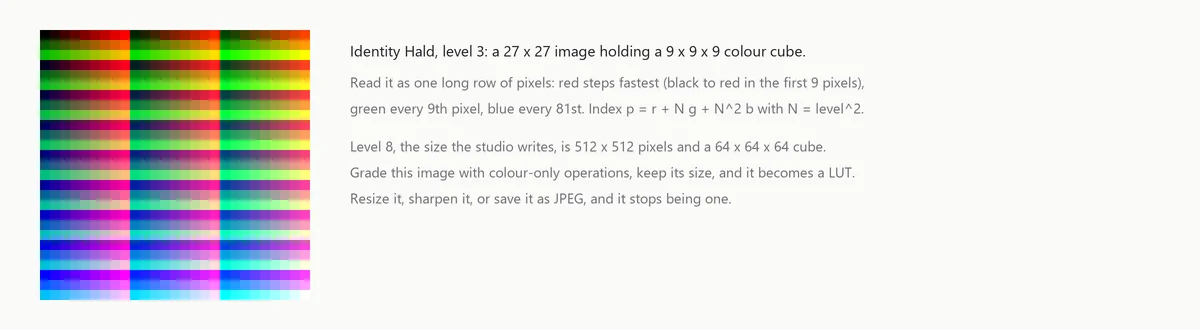
The workflow is simple: save a neutral Hald, grade it in any editor with colour-only operations, keep its size, and open it again as a LUT. The studio also writes its own current grade as a Hald. The format has no way to prove it is a Hald, so the importer checks only the shape: a square PNG whose edge is a perfect cube, level 2 to 8, fully opaque. Any square photo of 512 × 512 passes that check and becomes nonsense, which is why the documentation says plainly not to import an ordinary photo.
Two defects were in the image path, not in the maths. Hald import went through the browser Canvas, and Canvas colour-converts a PNG whose gAMA, cHRM or iCCP chunks describe something other than sRGB. A tagged Hald came back shifted by up to 136 codes before a single table value was read. Import now decodes the PNG itself and takes its 8- or 16-bit samples as numbers. The export was 8-bit only; it is now 16-bit. The difference is visible before any grading: 64 levels do not land on whole 8-bit codes, so an identity Hald in 8 bits is already off by up to 0.0019 at its nodes, in 0..1 units. In 16 bits the same error is 7.3 × 10⁻⁶.
Trilinear or tetrahedral
Between nodes the engine interpolates one of two ways. Trilinear blends all eight corners of the cell. Tetrahedral sorts the three fractional coordinates, picks one of six tetrahedra inside the cell and blends four corners. From cube.cpp:
if (fr >= fg && fg >= fb) { p0=c000; p1=c100; p2=c110; p3=c111; t1=fr; t2=fg; t3=fb; }
else if (fr >= fg && fr >= fb) { p0=c000; p1=c100; p2=c101; p3=c111; t1=fr; t2=fb; t3=fg; }
else if (fr >= fg) { p0=c000; p1=c001; p2=c101; p3=c111; t1=fb; t2=fr; t3=fg; }
else if (fr >= fb) { p0=c000; p1=c010; p2=c110; p3=c111; t1=fg; t2=fr; t3=fb; }
else if (fg >= fb) { p0=c000; p1=c010; p2=c011; p3=c111; t1=fg; t2=fb; t3=fr; }
else { p0=c000; p1=c001; p2=c011; p3=c111; t1=fb; t2=fg; t3=fr; }
return {p0[0] + (p1[0] - p0[0]) * t1 + (p2[0] - p1[0]) * t2 + (p3[0] - p2[0]) * t3,
        p0[1] + (p1[1] - p0[1]) * t1 + (p2[1] - p1[1]) * t2 + (p3[1] - p2[1]) * t3,
        p0[2] + (p1[2] - p0[2]) * t1 + (p2[2] - p1[2]) * t2 + (p3[2] - p2[2]) * t3};
Both reproduce any affine function exactly. On non-linear tables they differ, and neither wins everywhere. On a 2³ table of f = r·g·b at the point (0.2, 0.5, 0.8), trilinear returns the exact 0.08 and tetrahedral 0.2. So "tetrahedral is more accurate" is not a law.
Tetrahedral is still the default, and the arguments for it are not about accuracy. The Adobe specification asks readers to use tetrahedral interpolation for 3D tables, and OpenColorIO's interpolation enums map "best" for a 3D LUT to tetrahedral, so the studio samples a file the way the format expects it to be sampled. The second argument is geometric. Every one of the six tetrahedra has the cell diagonal from c000 to c111 as an edge, so a grey input is interpolated only from grey nodes. If the grade keeps greys neutral at the nodes, tetrahedral keeps them neutral between the nodes too. Trilinear mixes in the coloured corners.
To see the size of the effect I baked a synthetic look (an S-curve on Oklab L, chroma × 1.5, hue +12°, clipped to sRGB) into a 17³ table and sampled it with a Python port of the engine's sampler. This is a figure, not an engine measurement.
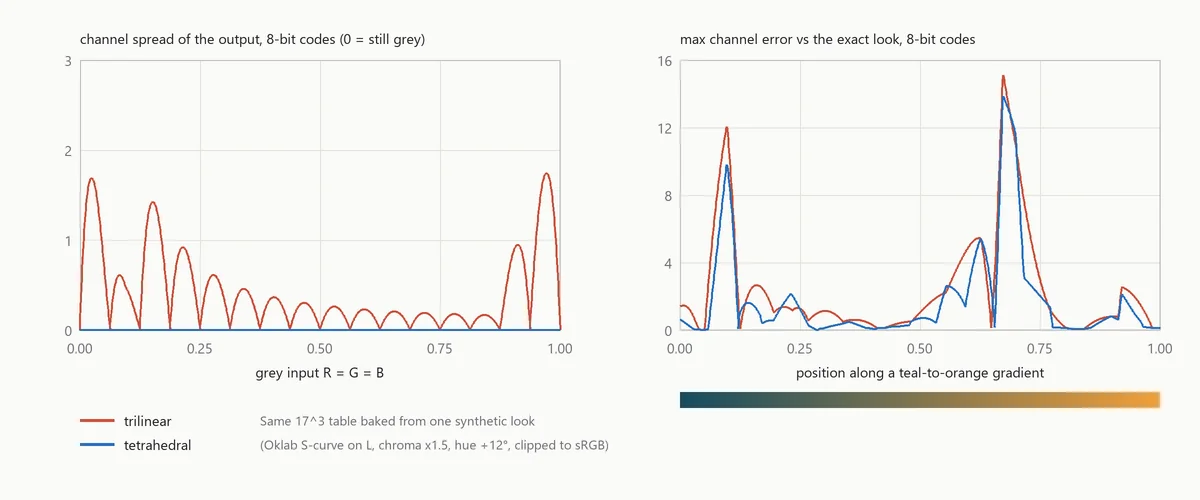
Trilinear tints the grey ramp by up to 1.74 codes; tetrahedral stays at 1.4 × 10⁻⁵ codes, and that residue comes from the ten-digit Oklab matrix, not from the interpolation. Along a coloured gradient the two are close, 15.1 and 13.9 codes at worst, and both peak exactly where one channel of the look crosses zero and starts to clip.
How big does the table need to be
The export offers 17³, 33³ and 65³. They are labelled compact, standard and dense. The 65³ option used to say "exact"; a review of the bake measured otherwise, and the label changed.
The engine's own check, "Verify export", bakes the table, serialises and re-parses it, then compares it with the direct transform on 4096 deterministic colours that are not on the grid:
for (int index = 0; index < 4096; ++index) {
  const atelier::Vec3 rgb{((index * 73 + 17) % 4099) / 4098., ((index * 193 + 47) % 4093) / 4092., ((index * 503 + 29) % 4091) / 4090.};
  const atelier::Vec3 direct = transform(rgb);
  const atelier::Vec3 sampled = atelier::sampleCube(decoded, rgb, grade.interpolation);
  for (std::size_t channel = 0; channel < 3; ++channel) {
    const double error = std::abs(direct[channel] - sampled[channel]);
    maximum = std::max(maximum, error);
    sum += error * error;
  }
}
It reports the maximum and the RMS error. That is a sampled test, not a bound, and not a perceptual ΔE.
On 12 September I ran it on a deliberately heavy grade with every global control switched on at once, from an imported LUT and a pin to a warm hue lock and Selective Color. This was engine 0.3.0, before the fixes of 22 and 23 September described in part 4.
| Table | File size | Error at nodes | Off-grid max | Off-grid RMS |
|---|---|---|---|---|
| 33³ | 1.16 MB | 1.7 × 10⁻⁶ | 0.529 | 0.0102 |
| 65³ | 9.13 MB | 1.7 × 10⁻⁶ | 0.267 | 0.0054 |
At the nodes (all 35,937 of them at 33³, every fourth node on each axis at 65³) the file reproduces the engine to float precision. Between them it does not. The worst probe was a near-yellow at the edge of the gamut whose blue channel should be 0.002; the 33³ table returned 0.531. A table with nodes 1/32 apart cannot represent a change narrower than that spacing, and a protection edge or a clip is exactly such a change. Doubling the resolution halved the error and did not remove it. The receipt marks the nodes PASS and the space between them HOLD, and records the conclusion I now use for the export: it is a global RGB approximation, and when a grade like this has to be reproduced exactly, the carrier is the PNG or the saved project.
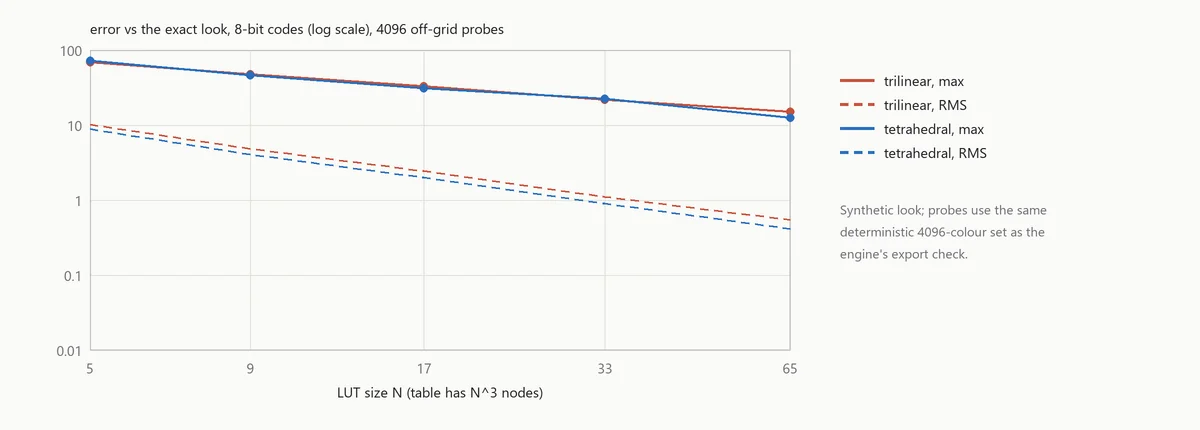
The synthetic look behaves the same way. Its RMS error falls by about half with each doubling of N, while the maximum, driven by the clip, falls more slowly.
Baking the stack
Baking itself is three nested loops. bakeCube in cube.cpp takes a compiled Transform, where the pin system is already solved, the curves compiled and the grade validated, and evaluates it at N³ nodes in red-fastest order, storing floats. The same Transform class renders the preview, the full-size PNG and the table, so the preview, the full-size PNG and the table share one C++ implementation of the grade. A JavaScript copy (compileTransform, bakeCube) still serves the thumbnails, the cube view and the Grid Lab.
One lesson went the other way: not everything should pass through a table inside the engine. The Levels computed by the ColorChecker solver used to be applied through a sampled 65³ LUT, which put up to 16.3 codes of error into the shadows. They are now evaluated exactly at the input, and the check measures the difference at 1.1 × 10⁻¹⁶.
Colour management: what the export does not do
The studio's LUTs are encoded sRGB to encoded sRGB, SDR, and nothing else. The main window decodes JPEG, WebP and 8-bit PNG through the browser Canvas as browser sRGB. The 16-bit PNG path exists only in the Grid Lab: it treats an untagged PNG as sRGB and says so, and it rejects an unsupported profile instead of converting it quietly. There is no ICC reading, no ICC profile written into the PNG (a 16-bit export carries only the sRGB and gAMA chunks), no Log, HDR or RAW input, and the export hint says the monitor profile is not included.
Profile-aware input and export is written up as a candidate tool with an acceptance contract, and it is not implemented. The contract: read the embedded ICC profile or stop and ask, never assume sRGB silently; convert once into a declared linear working space; write the chosen output profile into the PNG and read it back in a test; keep the display transform apart from the working pixels; never let a monitor calibration LUT leak into a CUBE, a Hald or a project. Photoshop can export a lookup table as an ICC profile as well as CUBE, 3DL and CSP (Adobe: export colour lookup tables). My exporter writes only CUBE and Hald.
Moving a look to another frame
A LUT moves the function, not the intent. If the second frame was shot under warmer light, the same skin arrives at a different RGB and the LUT answers differently. My research notes for the next version describe the fix as two stages: a per-frame normalisation N_i, fitted on matching patches and frozen, then the shared look T, so frame i gets T(N_i(x)). In the current engine the imported LUT comes first and white balance and exposure after it, so that order is not available yet.
Recovering a LUT from a single before-and-after photograph has a hard limit. If every colour in the photo has R below 0.6, then T and T + δ·max(R − 0.6, 0)² agree on every observed pixel and disagree everywhere else. The photo says nothing about the part of the cube it does not contain. That is why a Hald is the reliable carrier: it contains every node. It also explains the rules for grading one. No resize, no JPEG, no local masks or sharpening, and no automatic correction that recomputes itself on the Hald; freeze the auto parameters on the photo and apply the same function to the Hald. A hidden colour-profile conversion in the other editor becomes part of the extracted LUT too.
Where a LUT stops
Everything position-dependent stays out of the table by design, and a lot of real retouching is exactly that kind of work: dodge and burn, volume, skin. That is the other half of what I build. The models behind Happyin.ai produce per-pixel maps on the retoucher's own machine, and a C++ Photoshop plugin composites them as layers. None of that could travel as a LUT.
This closes the series. It started with exposure and white balance, the first stage of the same chain that this part turns into a table.