Levels: black and white points, gamma, channels and a chart
By Anastasiia Butova, ComfyUI and diffusion-model engineer, Belgrade · published 23 September 2026
Levels is the tonal tool with the least mystery: a clamp, a straight line and a power. In my colour studio it works on encoded sRGB values on purpose, after the linear-light multiply from part 1. The formula takes three lines. This article is about everything around it: the order of the master and channel sets, what the histogram actually measures, the eyedropper solvers, black and white points taken from a colour chart, and one LUT that cost sixteen codes next to black.
The formula
For one channel value x in 0…1, with input black b, input white w, gamma γ and output black and white ob, ow:
u   = clamp((x − b) / (w − b), 0, 1)
out = ob + (ow − ob) · u^(1/γ)
b lands on ob, w lands on ow, and everything outside the input range is clipped. With b = 0, w = 1, γ = 1, ob = 0, ow = 1 the function is the identity. The panel shows input and output points as 0…255 and gamma as 0.2…5. The editor keeps at least 1/255 between input black and white, and the model itself refuses w − b < 1e-6. The output pair has no such rule: output black above output white is an inversion, and an inversion is a legitimate thing to ask for.
The grey handle sits where the curve outputs the middle of the output range:
m = b + (w − b) · 0.5^γ
γ = ln((m − b) / (w − b)) / ln 0.5
So γ above 1 moves the handle towards black and brightens the midtones; γ below 1 does the opposite.
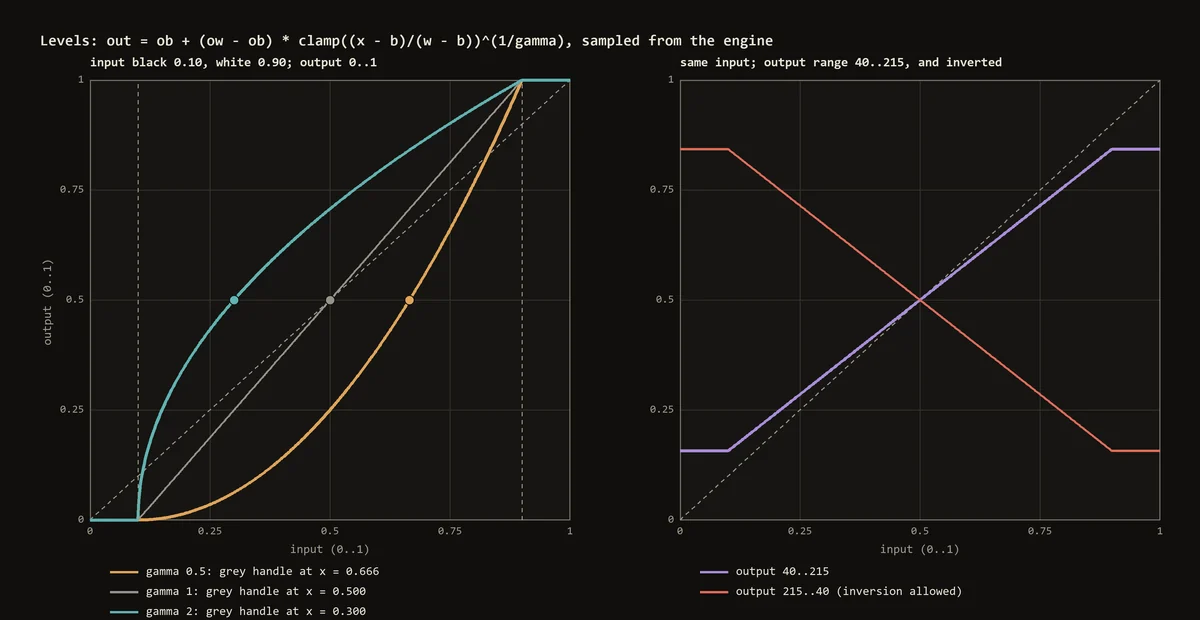
Adobe documents the same controls for Photoshop Levels, and Capture One goes further: its Levels page gives a linear remap example, input 0–220 to output 0–244, and describes the middle slider as gamma. Neither publishes an implementation, so I do not claim bit parity with either. What I claim is that the function above is the one both engines in the studio run.
Why encoded values and not linear light? Exposure and white balance model light, so they multiply linear RGB. Levels is a tonal remap that people drive against a histogram of code values, and a gamma handle in linear light would sit where nobody expects it. That is also why the grey eyedropper of Levels and the neutral picker of white balance are separate operations: one bends each channel's gamma in encoded values, the other multiplies linear channels.
Master first, then each channel
A grade holds one master set and three channel sets. The master set is stored in the same flat fields it always used, so a project saved before channel sets existed stays byte-identical. Each channel goes through the master first and then its own set:
// native/src/photo_color.cpp
double applyLevels(const LevelsSet& set, double x) {
  const double normalized = clamp((x - set.blackPoint) / (set.whitePoint - set.blackPoint));
  return set.outputBlack + (set.outputWhite - set.outputBlack) * std::pow(normalized, 1. / set.gamma);
}
// ... inside CompiledPhoto::apply
const LevelsSet master = masterLevels(grade);
for (int c = 0; c < 3; ++c) levelled[c] = applyLevels(grade.channelLevels[c], applyLevels(master, encoded[c]));
// Levels alone never needs Oklab: skipping the round trip keeps exact zeros and ones exact.
if (levelsOnly) return levelled;
y_c = f_c(f_master(x_c)) is my decision for this engine, not a documented fact about Photoshop's internal order.
The difference between the two kinds of set is the reason both exist. The same function on all three channels keeps a grey grey, but it does not keep the ratio R:G:B of a colour, so saturation moves with contrast. A per-channel set moves the channels apart, which is exactly what removes a cast, and exactly what adds one when misused.
The comment in that snippet hides a trap I only understood from numbers. Inside the photo stage Levels runs before any Oklab work, but the global colour transform in front of it used to send every pixel through Oklab and back, and that round trip is the identity only in exact arithmetic. Levels' gamma then amplified the residue near zero: with γ = 5, a channel that should be 0 but comes back as 1e-6 leaves Levels at 0.063, sixteen 8-bit codes. The first Oklab inverse in the engine used the published ten-digit matrices and returned the identity only to within 1.18e-6. It is now an exact inverse (1.9e-14), a grade whose global controls need no Oklab skips that pass entirely, and a γ = 5 case in the suite shows zero difference between JS and C++.
The second trap was quieter. For a while the JavaScript engine applied per-channel Levels and the C++ engine, which renders the preview and every export, silently dropped them. An independent audit found differences of up to 0.1875. A grey-eyedropper fix on the pixel (158, 128, 97) came out as (127.5, 127.5, 127.5) in JS and unchanged in C++. Now both apply the sets, the native parser rejects unknown channel names instead of skipping them, and the parity check over 257 samples shows 1.1e-16.
What the histogram measures
The histogram above the Levels controls has 256 bins. R, G and B are counted separately into the same bins, each pixel weighted by its alpha, fully transparent pixels skipped. It samples at most 32,768 pixels by stride, draws the square root of the frequency so the peaks do not flatten everything else, and shades the ranges below the black point and above the white point.
What matters is where it is measured: at the actual input of Levels, taken from the rendering pipeline itself. The first version re-ran a trimmed copy of the grade for the histogram and the curve read-outs, and the copy kept some later stages and dropped parts of Levels. An audit caught a pure yellow (255, 255, 0) plotted in the "before Levels" histogram at (229, 217, 102), and a red read-out with the channel mixer on that disagreed with the real input, 139.2 against 158.1. Now one compiled pipeline reports its own intermediate inputs, and both read-outs use it. On the 21 cases of the regression suite the error is 0.
Eyedroppers: three solvers that refuse
The three eyedroppers solve for per-channel parameters from one clicked pixel. Per-channel is the point: the same adjustment on all three channels cannot make unequal channels equal, so it cannot remove a cast. For a target t, the position it needs inside the input range is u = ((t − ob)/(ow − ob))^γ, and then
black eyedropper:  b = (s − u·w) / (1 − u)
white eyedropper:  w = b + (s − b) / u
grey eyedropper:   γ_c = ln(u_c) / ln(v_c),  u_c = (s_c − b)/(w − b),  v_c = (t − ob)/(ow − ob)
For the grey solve both u_c and v_c must lie strictly inside (0, 1). At an endpoint no gamma exists, so a clipped or crushed pixel is refused with its reason, never replaced by gamma 1, which would look as if the tool had done nothing. A gamma outside 0.2…5 is refused too. The default grey target is the sample's own mean, so the pixel keeps roughly its brightness and loses only its cast.
These solvers are exact to 6.7e-16 in the audit. The honest status: they live in levels-picker.mjs and are not yet connected to the panel. The panel edits the master set, and per-channel sets currently reach the engine only from saved projects. The chart path below has its own per-channel Levels record at the input of the grade.
Black and white points from a chart
The first version of the eyedroppers sent the clicked pixel to pure black and pure white, which matches Photoshop's defaults and is wrong for a ColorChecker. The Classic24's published sRGB values, attributed to X-Rite, put the white patch at 243 and the black patch at 52. Sending the white patch to 255 throws away everything the scene holds between 243 and 255; sending the black patch to 0 crushes 52 levels of shadow. X-Rite's own exposure guide says the same in plain words: the white square should be very light but not pure white, and the black patch should not read as pure black. The white patch is a diffuse reflector of about 90%, so a specular highlight in the frame is supposed to be brighter than it.
Photoshop lets you edit the target colours of its eyedroppers, which tells you 0 and 255 are a convention and not a property of the tool. So the solvers take a target, and there is a chart preset with the published values (for charts made after November 2014; older charts have different numbers).
Clicking black and then white has a second problem: the second click moves the input white, and every position inside the range moves with it, so the black patch leaves its target. A free-hand pick cannot avoid that, because each click knows only its own reference. With a chart both references are known at once, so the pair is solved together:
w − b = (s_w − s_b) / (u_w − u_b), b = s_b − u_b · (w − b)
The path that is wired end to end starts from a separate UNet/VAE model from my colour-checker project. It predicts what a Classic24 would look like at a spot you choose in the frame, which gives 24 virtual patches rather than a detected physical chart. A Python solver then turns the predicted chart into per-channel Levels:
# packages/checker/vendor/checker_levels.py, nested inside solve(); docstring omitted.
# black_target and white_target are the chart's published values for patches 24 and 19.
def ends(gamma: np.ndarray):
    low, high = black_target ** gamma, white_target ** gamma
    span = (white_sample - black_sample) / (high - low)
    return black_sample - low * span, span
Gamma comes from the four greys between the ends. Each grey asks for its own gamma per channel, found by 60 steps of bisection inside 0.2…5, and the median answer wins. A least-squares average lets one bad patch drag everything: with three greys asking for gamma 1 and a fourth crushed to 0.02, the fit asked for 2.74. One grey on its own is fragile in a different way: on the first real photograph I measured, patch 20 alone was unreachable at three placements out of five, while the ramp around it was ordinary.
The solver allows input points outside 0…1, because a black point below 0 is what a lift looks like from the input side. Refusing such points cost four placements out of five on that first photograph. A test of the JS eyedroppers also corrected one of my own claims: it asserted that chart targets clip nothing, and it failed, because in warm light the green channel's input white landed at 0.949. Highlights are allowed to be brighter than a diffuse white patch, so the assertion now says what chart targets really give: the patch stops being the ceiling. The JS eyedroppers and this Python solver live in different repositories, so a test pins fixtures that both must agree on.
The LUT that cost sixteen codes
The chart result is stored as a small inputLevels record and evaluated exactly, per channel, at the input of the grade. Until 23 September it was baked into a 65³ input LUT instead. Levels are separable, so both trilinear and tetrahedral sampling reduce to linear interpolation between nodes 1/64 apart, and x^(1/γ) is steepest right next to the black point. The audit measured 13.8 codes of error there, and the new check found 16.3 codes on its samples with gamma 3. Exact evaluation brings it to 1.1e-16.
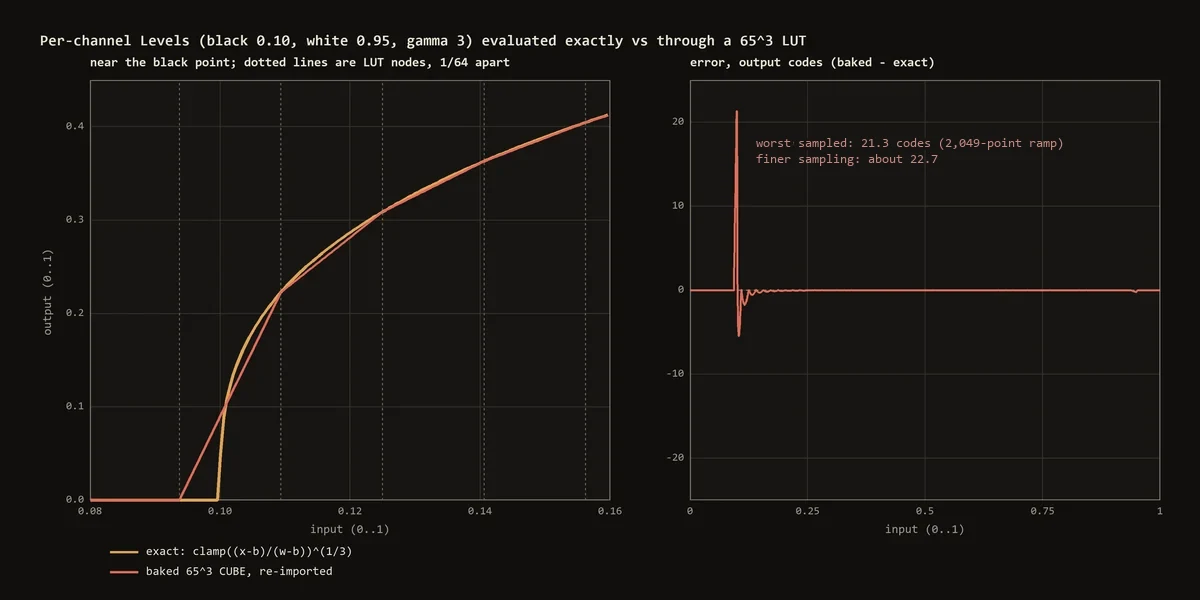
I reproduced the trap with the engine for this article: black 0.10, white 0.95, gamma 3, baked into a 65³ CUBE, re-imported and compared on a dense ramp. On a 2,049-point ramp the worst error was 21.3 codes just below the black point, where the exact result is 0 and the lattice still interpolates towards the next node, and 10.7 just above it; sampled finely enough, the peak is about 22.7 codes on both sides of the black point. Above input 0.16 the error stays at about a quarter of a code (0.251 at most). A separable per-channel function does not belong in a 3D lattice when you can evaluate it exactly.
Auto levels and auto colour: designed, not built
There is no Auto button in the engine yet. The design is written down: histograms from the unchanged input of the chosen stage and region, visible clip fractions at each end, and black and white points at those quantiles. Per-channel mode takes a pair per channel and changes colour; composite mode takes one pair and keeps the neutral axis. A range narrower than a threshold means "undefined", not "identity", and the found parameters are saved so reopening a project never quietly recomputes them. The fractions must be visible because even the reference is not settled: Adobe's page on quick tonal adjustments mentions both 0.5% and 0.1% as clipping defaults in different sections.
Limits
- Levels runs on 8-bit SDR encoded sRGB in the main window. No clipping preview on the image, only shaded ends on the histogram.
- The panel edits the master set. Per-channel eyedroppers exist as tested solvers but are not connected to it yet.
- Chart targets are published values for one chart generation, not a spectrophotometer reading of your chart.
- No auto levels or auto colour.
Next part: Curves: spline choice, overshoot, luma and LUT baking. My on-device retouching work, a C++ Photoshop plugin with its own models, is on happyin.ai.