The channel mixer, a 3×3 matrix: what it preserves, where it clips, where it runs
By Anastasiia Butova, ComfyUI and diffusion-model engineer, Belgrade · published 23 September 2026
After the perceptual range tools of part 4, the channel mixer is the bluntest instrument in my colour studio: three output channels, each a weighted sum of the three input channels, nine numbers in total. The code is a few lines. The interesting questions are around it: which RGB it mixes, what "preserve" means, what happens outside 0..1, and where in the chain it runs. I added it to the studio on 20 September. Below is how it works and, just as plainly, what it does not do.
The whole operation
[ R′ ]   [ m00 m01 m02 ] [ R ]
[ G′ ] = [ m10 m11 m12 ] [ G ]
[ B′ ]   [ m20 m21 m22 ] [ B ]
Every coefficient must be finite and inside [−4, 4]; the default is the identity matrix. In the C++ engine (color.cpp) the multiplication and its stage look like this:
Vec3 applyChannelMatrix(const std::array<double, 9>& matrix, const Vec3& encodedRgb) {
  return {
      matrix[0] * encodedRgb[0] + matrix[1] * encodedRgb[1] + matrix[2] * encodedRgb[2],
      matrix[3] * encodedRgb[0] + matrix[4] * encodedRgb[1] + matrix[5] * encodedRgb[2],
      matrix[6] * encodedRgb[0] + matrix[7] * encodedRgb[1] + matrix[8] * encodedRgb[2],
  };
}
// ... inside Transform::apply, after curves and the photo stage:
if (hasChannelMatrix) {
  out = applyChannelMatrix(grade.channelMatrix, out);
  for (double& value : out) value = clamp(value);
}
hasChannelMatrix is false for an exact identity, so an untouched mixer costs nothing and changes nothing. Projects saved before the mixer existed have no channelMatrix field at all. The parser reads that as identity, and a dedicated check confirms that such an old grade renders with a difference of exactly 0 in both the JavaScript implementation and the C++ engine.
Which RGB it mixes
The matrix works on encoded sRGB, the same 0..1 values a PNG or JPEG stores, not on linear light. That is written into the tool's contract as "encoded sRGB → encoded sRGB", and it has a visible consequence: mixing encoded values is not mixing light.
Take pure red and the row R′ = 0.5 R + 0.5 G. In encoded sRGB the red output is 0.5. The same mix done in linear light and encoded back gives 0.735. The encoded mix is noticeably darker, and the gap grows with the difference between the channels being mixed. There is no linear-light mode in the current engine, so a recipe written for a linear mixer will not transfer as numbers.
What a row sum preserves, and what it does not
If every row sums to 1, a grey input [x, x, x] stays [x, x, x], because M·1 = 1. The interface shows the three row sums next to the matrix and says in words whether neutrals survive. The maths check confirms it to 1.1 × 10⁻¹⁶ on greys of 0.18, 0.54 and 1 with a matrix whose rows are (0.70, 0.20, 0.10), (0.15, 0.70, 0.15) and (0.20, 0.20, 0.60).
That is neutral preservation, and it is easy to read it as brightness preservation. It is not. Luma is w·RGB with w = (0.2126, 0.7152, 0.0722), and keeping the luma of every colour needs wᵀM = wᵀ: a condition on the columns weighted by w, not on the rows. Swapping red and blue satisfies the row rule perfectly and keeps every grey, yet pure red drops from luma 0.2126 to 0.0722. The mixer has no luma-preserving mode; the row sums are the only invariant it reports.
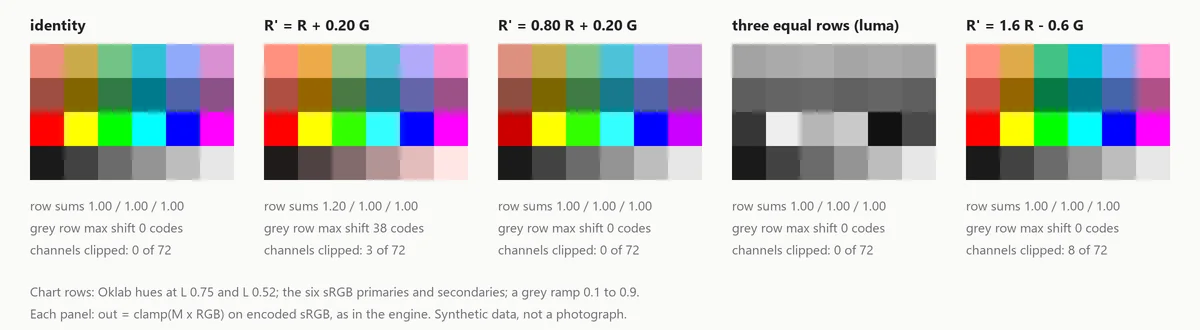
The opposite mistake is just as easy. R′ = R + 0.20 G makes the red row sum 1.2, and on the synthetic chart below it tints the grey ramp by up to 38 codes towards red. Scaling the row to R′ = 0.80 R + 0.20 G still moves some green into the red channel, and the greys stay exactly where they were.
No offset column
Photoshop's Channel Mixer has a Constant slider from −200 % to +200 % that makes the output channel darker or lighter, and source sliders limited to ±200 % (Adobe: mix colour channels). Mine has no offset. It is a pure 3×3 map, not a 3×4 affine one. The coefficients go to ±4, that is ±400 %. The engine's photo stage does carry per-channel Levels with an output black and white for R, G and B, but no control in the interface writes them yet (part 2 says so), and they run before the mixer, not after it. A lifted or crushed channel after the mix is simply not available today. I make no claim of numerical parity with Photoshop or any other closed editor; the matrix is my own declared contract.
Monochrome without a checkbox
There is no Monochrome switch. Three identical rows give a monochrome image, and the row values decide the look. With (0.2126, 0.7152, 0.0722) in every row the output is Rec. 709 luma computed on encoded values, Y′, not relative luminance: the weights are the standard ones, the domain is gamma-encoded. The row sums are 1, so greys stay put and the chart turns into a clean grey scale.
Photoshop's Channel Mixer documents its black-and-white presets the same way, as weight triples (not to be confused with the separate Black & White adjustment, whose presets share some names): the yellow-filter preset is Red 34 %, Green 66 %, Blue 0 %, and the infrared one is Red −70 %, Green 200 %, Blue −30 %. Typed into all three rows, a triple like that gives a comparable mix here. I have not compared the pixels with Photoshop's output, so I would not promise they match.
Clipping and gamut
After M·RGB each output channel is clamped to [0, 1]. The comment in the engine states it as the declared SDR behaviour: rows may intentionally exceed the display range and therefore clip, instead of changing the meaning of the earlier Oklab gamut compression. Negative coefficients are the usual way to get there. R′ = 1.6 R − 0.6 G keeps greys (the row sums to 1) and still pushes 8 of the 72 channel values on the chart outside the range. They clip, and detail there is gone. The check for this feeds [0.8, 0.3, 0.4] through a red row of (2, 0, 0) and asserts [1, 0.3, 0.4]: the clamp is explicit, not an accident of the output encoder.
The mixer runs after the soft gamut compression of the Oklab stage, so it gets no help from it. A colour that the Oklab stage brought gently inside sRGB can be pushed out again by the matrix and hard-clipped. The contrast control shares this property; at contrast 1.5 its clamp flattens 86 of 256 input codes, and that is an open ticket, not a solved problem.
Where it sits in the pipeline
The order inside Transform::apply in color.cpp:
- Input stage: optional checker Levels, then the imported LUT, blended by its own strength.
- Linear light: white-balance gains, temperature and tint, exposure.
- Oklab creative stage: reference match, hue and saturation, pins, hue bands; then optional soft gamut compression and the return to encoded sRGB.
- Contrast around 0.5 in encoded sRGB.
- Master curve, then the R, G and B curves.
- Photo stage: Levels, luma curve, tone controls, vibrance, grading wheels, Selective Color.
- The channel mixer, then the clamp.
- Protected colours and hue locks blend back towards the original pixel.
- Global strength blends the whole result with the original.
Two things follow from this order. Protections come after the mixer, so a locked skin hue keeps its exact source RGB even when the matrix swaps channels around it. And every step up to and including the mixer depends only on the pixel's own RGB, never on its position or neighbours, so the mixer bakes into CUBE and Hald exports with the rest of the global chain.
How it is checked
- A maths family runs the matrix against its own definition, checks the neutral rows, the explicit clip and the legacy grade, and rejects a coefficient of 5 with a named error.
- The native engine renders the legacy grade with a difference of 0.
- A seeded JavaScript and C++ parity run over 600 random valid grades, each with a 30 % chance of a perturbed mixer, agrees to 8.7 × 10⁻¹⁴ across 196,200 channel values.
These prove the arithmetic and the contract. They say nothing about whether a given matrix looks good on a given photograph, and I do not use them to claim that.
Limits
- Encoded sRGB only; no linear-light mode.
- No offset column, no Monochrome switch, no luma-preserving option. Row sums are shown; luma is not.
- A hard clamp to [0, 1] after the matrix, with no gamut compression of its own.
- SDR, 8-bit Canvas decoding in the main window. The 16-bit path exists only in the Grid Lab.
The next and last part is about 3D LUTs: how this whole global chain, mixer included, gets baked into a .cube or a Hald image, and how much of it survives between the nodes.